

Overview
Webhook notifications from SIBS Payment Gateway (SPG) contain sensitive transaction data and are transmitted in encrypted form to protect against fraud and tampering.
To process webhook notifications correctly, the merchant system must:
- Decrypt the payload
- Validate its integrity and authenticity
- Ensure secure handling of all cryptographic material
This section describes the required mechanisms to securely handle webhook notifications.
Security Model
SPG webhook security is based on the following principles:
- Confidentiality – payload is encrypted
- Integrity – payload is protected against tampering
- Authenticity – payload originates from SPG
- Replay protection – duplicate or malicious reuse must be handled
Encrypted Webhook Payloads
Webhook payloads are not delivered as plain JSON.
They are transmitted in an encrypted format, where:
- The request body contains the encrypted payload (Base64 encoded)
- Additional cryptographic parameters are provided via HTTP headers
After decryption, the resulting payload corresponds to the standard webhook structure described in this documentation.
Encryption and Decryption Specifications
Algorithm
- Encryption algorithm: AES
- Block mode: GCM
- Padding: None
Encoding Rules
- Encrypted payload (body): Base64 encoded
- Initialization Vector (IV): Base64 encoded
- Text encoding: UTF-8 (when converting between string and byte representation)
Required Headers
The following HTTP headers are required to decrypt the webhook payload:
X-Initialization-Vector→ Initialization Vector (Base64)X-Authentication-Tag→ Authentication tag (Base64)
These values must be used together with the secret key to perform AES-GCM decryption.
Secret Key Management
Source of the Secret
The secret key must be obtained from the SPG Backoffice, in the webhook configuration section.

Usage
The secret key is used to:
- Decrypt the webhook payload
- Validate the authenticity and integrity of the message (via GCM authentication tag)
Best Practices
- Store the secret in a secure vault or key management system
- Never expose the secret in logs or client-side code
- Restrict access to authorized systems only
- Rotate the secret if supported
Decryption Process
Webhook notifications are received in encrypted form and must be decrypted using the parameters provided in the HTTP request.
General Flow
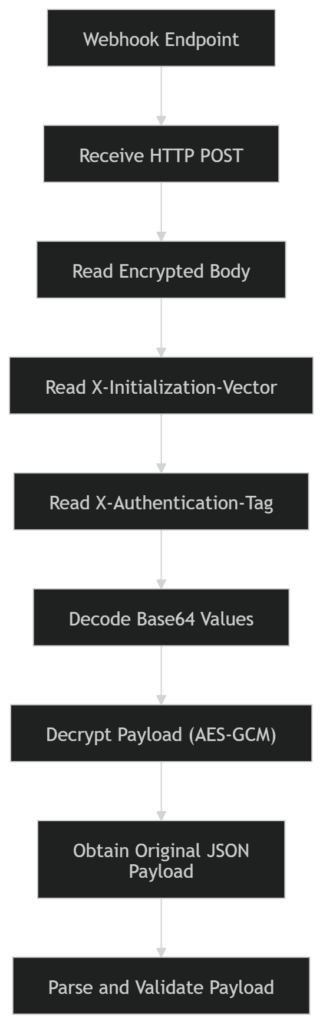
Encrypted Body
- The request body contains the encrypted payload, encoded in Base64
- After Base64 decoding, the result corresponds to the ciphertext to be decrypted
Required HTTP Headers
The decryption process depends on the following headers included in the webhook request:
X-Initialization-Vector
- Contains the Initialization Vector (IV) used in the encryption process
- Encoding: Base64
- Must be decoded before being used in the decryption algorithm
X-Authentication-Tag
- Contains the authentication tag generated by the AES-GCM algorithm
- Used to verify:
- Data integrity
- Authenticity of the payload
- Encoding: Base64
- Must be decoded and provided to the decryption operation
Decryption Inputs
To perform decryption, the following inputs are required:
- Secret key (configured in SPG Backoffice)
- Encrypted payload (request body, Base64 decoded)
- Initialization Vector (from
X-Initialization-Vector, Base64 decoded) - Authentication Tag (from
X-Authentication-Tag, Base64 decoded)
Decryption Operation
The merchant system must:
- Decode all Base64-encoded inputs
- Apply AES decryption using:
- Mode: GCM
- Padding: None
- Provide:
- Key
- IV
- Authentication Tag
- Obtain the original JSON payload (UTF-8 encoded)
Example Decryption Implementation
Format of body: Base64 Format of Initialization Vector: Base64
Secret: O0Bur9uhZkS54NkwFhVyeutED6DhLbOQUBDt3i3W/C4=
X-Authentication-Tag: Ytw9bzOS1pXqizAKMGXVQ==
Content-Type: text/plain
X-Initialization-Vector: Ldo3OyWNgRchSF3C
Body before decryption
WgErmJOV6wg3BuRkrgZLUUnh57BYzhIzvBFdpadHRsc43UcjtZEevRGDIDu3YxocXMXe8O+xQpMRxwTJPv766IaNqUiUEjAIj

ZSMEYCZ0pBursUYB+9nB4eqNUiAS2MJ9sR+Cj2iBf6G6KXLfp9K6dK7c0UED5XrJwbovY8X8pMyxktFTEaflp0e76ZywsCQvt

qEtqNz9uYEyqmAANbsBwbwyWpkCC8H1kZN2fV3CYetW1CTPmWdPp3C18Yfh826NN4XlKu1VmUmea70PyjmRKSsjPXpfrRX8ud

elVIK2WTFtnRxD4x588d1nlGY5D5DQmJ8KYZzfvjTmDXGAPiRIEGuXp8h6rBQXS8P/m1llBtboGgQv4MmW3zvq0G6KFlYIcM=
Body after decryption
{
    "returnStatus": {
        "statusMsg": "Success",
        "statusCode": "000"
    },
    "paymentStatus": "Success",
    "paymentMethod": "CARD",
    "transactionID": "WebhookTest",
    "amount": {
        "currency": "EUR",
        "value": 10.0
    },
    "merchant": {
        "terminalId": 1000000
    },
    "paymentType": "PURS",
    "notificationID": "f153c248-e7be-4c12-8d88-6c9f1f3b83e4"
}
Examples
C#
using System;
using System.Security.Cryptography;
using System.Text;

public static class Program {
    public static void Main() {
        byte[] secret = System.Convert.FromBase64String(“6fNDiYU0T0/evFpmfycNai/AqF24i+rT0OmuVw0/sGQ=”);
        byte[] ciphertext = System.Convert.FromBase64String(“9bIjURJIcwoKvQr+ifOTH3HbMX+IqmsRqHuG/I1GfbSX89JE5DcWh/p8QROC5pRAuYZ7″+“ln7RSkHXJdZpVz1LFQ2859WsetvHHui7qYmfxATOO1j0AQuPdAD3FeRH0kR4s/v3c2nV8″+“1DnUXFCnQER/+VWrYdbu5vn8gm+diSE6CHvkK+ODy0ebVi5O6VBnWVjgBUG33VwWiAyIl”+“7Ik435V55WnZgynH3GfbVYoGwZ5UhYtn3yw2yruiLAKu6VTBvnh/ZJP21cHCJSF6NPSd+8″+“1gzWFU/+ECm3cf3uBbCkmKmL7HxRhRxhG0lMtX6ELZOXuw3eDJ1BTu+sSMkV/5Xk+5XX48″+“XmP6CGZ7KmP7Q3Fw1kZmhn0unFyv0Gw8PjT1Ohny/HMgNl16I=”);
        byte[] nonce = System.Convert.FromBase64String(“RYjpCMtUmK54T6Lk”);
        byte[] tag = System.Convert.FromBase64String(“FUajWHmZjP4A5qaa1G0kxw==”);
        using (var aes = new AesGcm(secret))
        {
            var plaintextBytes = new byte[ciphertext.Length];
            aes.Decrypt(nonce, ciphertext, tag, plaintextBytes);
            string decrypt = Encoding.UTF8.GetString(plaintextBytes);
            Console.WriteLine(decrypt);
        }
    }
}
Java
import java.security.Security;
import java.util.Base64;
import javax.crypto.Cipher;
import javax.crypto.spec.IvParameterSpec;
import javax.crypto.spec.SecretKeySpec;
import com.google.common.base.Charsets;
import org.apache.commons.lang3.ArrayUtils;
import org.bouncycastle.jce.provider.BouncyCastleProvider;

// For Java and JVM-based languages, you might need to install unrestricted policy file for JVM,
// which is provided by Sun. Please refer BouncyCastle FAQ if you get
// java.lang.SecurityException: Unsupported keysize or algorithm parameters or
// java.security.InvalidKeyException: Illegal key size.
// If you cannot install unrestricted policy file for JVM because of some reason, you can try with reflection: See here.

public class Test {

    public static void main(String[] args) {

        try {
            Security.addProvider(new BouncyCastleProvider());

            // Data from configuration
            String keyFromConfiguration = "6fNDiYU0T0/evFpmfycNai/AqF24i+rT0OmuVw0/sGQ=";

            // Data from server
            String ivFromHttpHeader = "RYjpCMtUmK54T6Lk";
            String authTagFromHttpHeader = "FUajWHmZjP4A5qaa1G0kxw==";
            String httpBody = "9bIjURJIcwoKvQr+ifOTH3HbMX+IqmsRqHuG/I1GfbSX89JE5DcWh/p8QROC5pRAuYZ7"+"ln7RSkHXJdZpVz1LFQ2859WsetvHHui7qYmfxATOO1j0AQuPdAD3FeRH0kR4s/v3c2nV8"+"1DnUXFCnQER/+VWrYdbu5vn8gm+diSE6CHvkK+ODy0ebVi5O6VBnWVjgBUG33VwWiAyIl"+"7Ik435V55WnZgynH3GfbVYoGwZ5UhYtn3yw2yruiLAKu6VTBvnh/ZJP21cHCJSF6NPSd+8"+"1gzWFU/+ECm3cf3uBbCkmKmL7HxRhRxhG0lMtX6ELZOXuw3eDJ1BTu+sSMkV/5Xk+5XX48"+"XmP6CGZ7KmP7Q3Fw1kZmhn0unFyv0Gw8PjT1Ohny/HMgNl16I=";

            // Convert data to process
            byte[] key = Base64.getDecoder().decode(keyFromConfiguration);
            byte[] iv = Base64.getDecoder().decode(ivFromHttpHeader);
            byte[] authTag = Base64.getDecoder().decode(authTagFromHttpHeader);
            byte[] encryptedText = Base64.getDecoder().decode(httpBody);

            // Unlike other programming language, We have to append auth tag at the end of
            // encrypted text in Java
            byte[] cipherText = ArrayUtils.addAll(encryptedText, authTag);

            // Prepare decryption
            SecretKeySpec keySpec = new SecretKeySpec(key, 0, 32, "AES");
            Cipher cipher = Cipher.getInstance("AES/GCM/NoPadding");
            cipher.init(Cipher.DECRYPT_MODE, keySpec, new IvParameterSpec(iv));

            // Decrypt
            byte[] bytes = cipher.doFinal(cipherText);
            System.out.println(new String(bytes, Charsets.UTF_8));

            } catch (Exception e) {
            e.printStackTrace();
            }

    }

}
PHP
function sodium_decrypt( $webhookSecret, $iv_from_http_header, $http_body , $auth_tag_from_http_header ){
    $key = mb_convert_encoding($webhookSecret, "UTF-8", "BASE64");
    $iv = mb_convert_encoding($iv_from_http_header, "UTF-8", "BASE64");
    $cipher_text = mb_convert_encoding($http_body, "UTF-8", "BASE64") . mb_convert_encoding($auth_tag_from_http_header, "UTF-8", "BASE64");
    $result = sodium_crypto_aead_aes256gcm_decrypt($cipher_text, "", $iv, $key);
    return $result;
}

$webhookSecret = "6fNDiYU0T0/evFpmfycNai/AqF24i+rT0OmuVw0/sGQ=";
$iv_from_http_header = "RYjpCMtUmK54T6Lk";
$auth_tag_from_http_header = "FUajWHmZjP4A5qaa1G0kxw==";
$http_body = "9bIjURJIcwoKvQr+ifOTH3HbMX+IqmsRqHuG/I1GfbSX89JE5DcWh/p8QROC5pRAuYZ7" .

"ln7RSkHXJdZpVz1LFQ2859WsetvHHui7qYmfxATOO1j0AQuPdAD3FeRH0kR4s/v3c2nV8" . "1DnUXFCnQER/+VWrYdbu5vn8gm+diSE6CHvkK+ODy0ebVi5O6VBnWVjgBUG33VwWiAyIl" . "7Ik435V55WnZgynH3GfbVYoGwZ5UhYtn3yw2yruiLAKu6VTBvnh/ZJP21cHCJSF6NPSd+8" .
"1gzWFU/+ECm3cf3uBbCkmKmL7HxRhRxhG0lMtX6ELZOXuw3eDJ1BTu+sSMkV/5Xk+5XX48" .
"XmP6CGZ7KmP7Q3Fw1kZmhn0unFyv0Gw8PjT1Ohny/HMgNl16I=";

// Decrypt message
$result = sodium_decrypt($webhookSecret, $iv_from_http_header, $http_body , $auth_tag_from_http_header);
print($result);
Python
import base64
from Cryptodome.Cipher import AES

def decrypt_AES_GCM(encryptedMsg, authTag, secretKey, iv):
iv = base64.b64decode(iv)
encryptedMsg = base64.b64decode(encryptedMsg)
secretKey = base64.b64decode(secretKey)
authTag = base64.b64decode(authTag)
aesCipher = AES.new(secretKey, AES.MODE_GCM, iv)
plaintext = aesCipher.decrypt_and_verify(encryptedMsg, authTag)

return plaintext

example = {
    "encoded" : "9bIjURJIcwoKvQr+ifOTH3HbMX+IqmsRqHuG/I1GfbSX89JE5DcWh/p8QROC5pRAuYZ7" \
    "ln7RSkHXJdZpVz1LFQ2859WsetvHHui7qYmfxATOO1j0AQuPdAD3FeRH0kR4s/v3c2nV8" \
    "1DnUXFCnQER/+VWrYdbu5vn8gm+diSE6CHvkK+ODy0ebVi5O6VBnWVjgBUG33VwWiAyIl" \
    "7Ik435V55WnZgynH3GfbVYoGwZ5UhYtn3yw2yruiLAKu6VTBvnh/ZJP21cHCJSF6NPSd+8" \
    "1gzWFU/+ECm3cf3uBbCkmKmL7HxRhRxhG0lMtX6ELZOXuw3eDJ1BTu+sSMkV/5Xk+5XX48"
    "XmP6CGZ7KmP7Q3Fw1kZmhn0unFyv0Gw8PjT1Ohny/HMgNl16I=",
    "iv" : "RYjpCMtUmK54T6Lk",
    "tag" : "FUajWHmZjP4A5qaa1G0kxw==",
    "secret" : "6fNDiYU0T0/evFpmfycNai/AqF24i+rT0OmuVw0/sGQ="
}

result = decrypt_AES_GCM(example['encoded'], example['tag'], example['secret'], example['iv'])
print(result)
Important Notes
- If authentication tag validation fails, the payload must be considered invalid
- The payload must not be processed if decryption is unsuccessful
- All Base64 values must be decoded before use
- All string-to-byte conversions must use UTF-8 encoding
Payload Validation
After decryption, the payload must be validated.
Validation Steps
- Ensure valid JSON format
- Validate presence of critical fields:
transactionIDpaymentStatus
- Verify logical consistency
If decryption fails:
- The payload must be considered invalid
- Processing must be aborted
Replay Protection and Idempotency
Webhook notifications may be retried or duplicated.
Recommended Protections
- Use
transactionIDas idempotency key - Store processed transactions
- Ignore duplicates or ensure safe reprocessing
Transport Security
Webhook endpoints must enforce secure communication.
Requirements
- HTTPS only
- TLS 1.2 or higher
- Valid SSL certificate
Error Handling in Decryption
Typical Failure Scenarios
- Invalid secret key
- Incorrect IV or authentication tag
- Corrupted payload
- Authentication failure (GCM tag mismatch)
Recommended Behavior
- Log the error (without exposing sensitive data)
- Do not process the payload
- Allow retry if appropriate
Common Decryption Errors
The following issues are commonly observed during webhook integration and may prevent successful decryption or validation of the payload.
Incorrect AES Mode
- Using AES-CBC or other modes instead of AES-GCM
Impact:
- Decryption may succeed incorrectly or fail entirely
- Authentication tag validation is not performed
Missing or Invalid Authentication Tag
- Not providing the
X-Authentication-Tagheader - Using an incorrectly decoded tag
Impact:
- Decryption fails with authentication error
- Payload integrity cannot be verified
Incorrect Initialization Vector (IV)
- Not decoding Base64 correctly
- Using an incorrect IV length or value
Impact:
- Decryption fails
- Output is invalid or corrupted
Invalid Secret Key
- Using a wrong or outdated secret
- Incorrect key encoding (e.g., treating Base64 as plain text)
Impact:
- Decryption fails
- Authentication tag validation fails
Incorrect Base64 Handling
- Not decoding the request body from Base64
- Double decoding or incorrect character encoding
Impact:
- Ciphertext is invalid
- Decryption produces incorrect results
Ignoring UTF-8 Encoding
- Using incorrect string encoding when converting decrypted bytes
Impact:
- Payload appears corrupted
- JSON parsing fails
Processing Payload Without Valid Decryption
- Attempting to parse or use payload before verifying decryption success
Impact:
- Invalid data processed
- Security vulnerabilities
Not Handling Decryption Failures Properly
- Failing silently
- Not logging errors
- Accepting invalid payloads
Impact:
- Loss of observability
- Potential data inconsistency or security risks
Recommendation

Ensure that:
- All cryptographic inputs are correctly decoded
- AES-GCM is used as specified
- Errors are logged for troubleshooting
- Invalid payloads are safely discarded
Common Security Pitfalls
- Using incorrect AES mode (e.g., CBC instead of GCM)
- Ignoring authentication tag validation
- Not decoding Base64 inputs correctly
- Logging decrypted sensitive data
- Hardcoding secret keys
- Skipping payload validation
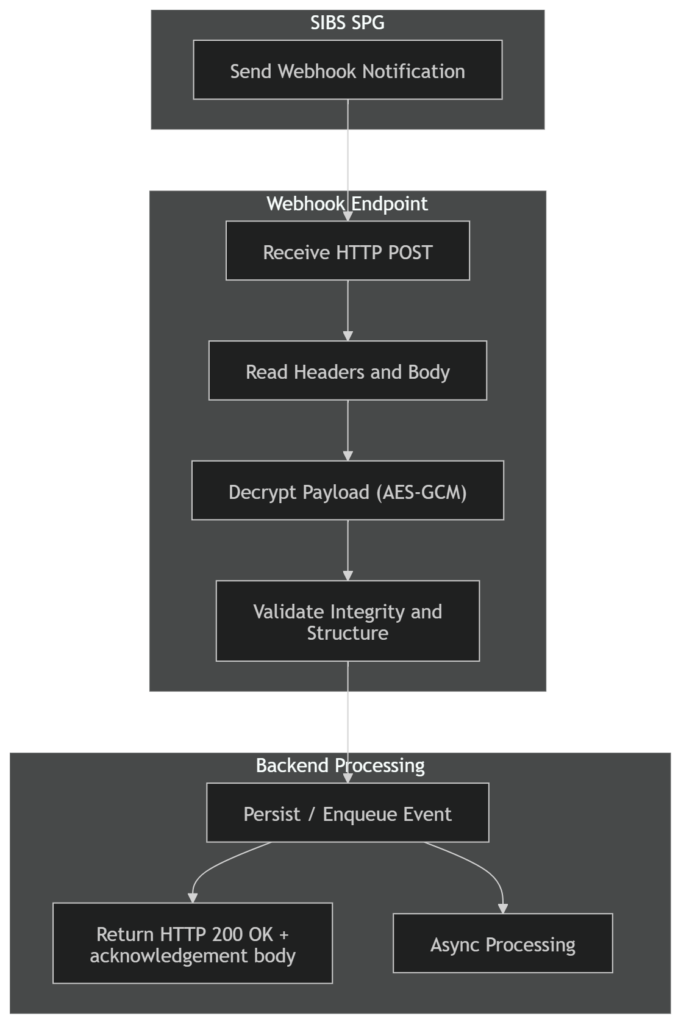
Relationship with Webhook Processing
Security and validation are part of the webhook handling pipeline.
The correct sequence is:

Summary
Webhook security in SPG requires:
- Decrypting payloads using AES-GCM with Base64-encoded inputs
- Using IV and authentication tag provided in HTTP headers
- Managing the secret key obtained from the SPG Backoffice
- Validating payload integrity before processing
- Ensuring secure transport and idempotent handling
A correct implementation ensures secure, reliable, and production-grade webhook processing.