

Overview
The SIBS Magento plugin enables secure payment acceptance directly within the Magento checkout experience.
It integrates with the Magento order lifecycle and provides built-in support for SIBS SPG payment methods and notifications.
Benefits
- Native Magento checkout experience
- Automatic order status synchronization
- Support for asynchronous payments
- No direct API integration required
Before You Start
Ensure you have the following credentials from SIBS onboarding:
- Terminal ID : the terminal ID assigned to the merchant, by the SIBS OnBoarding team
- Client ID : merchant application identifier assigned by the SIBS OnBoarding team
- Authentication token : Authentication Token obtained from SIBS Backoffice
- Environment (Sandbox or Production)
Installation
Step 1 – Install the plugin
Download the SIBS Magento plugin package provided during onboarding.
NOTE : Installing the plugin requires some technical knowledge. If you are comfortable dealing changing your webhosting settings and accessing your server, you can follow the technical guide below.
Magento plugin package install
Install and enable the module following Magento extension procedures.
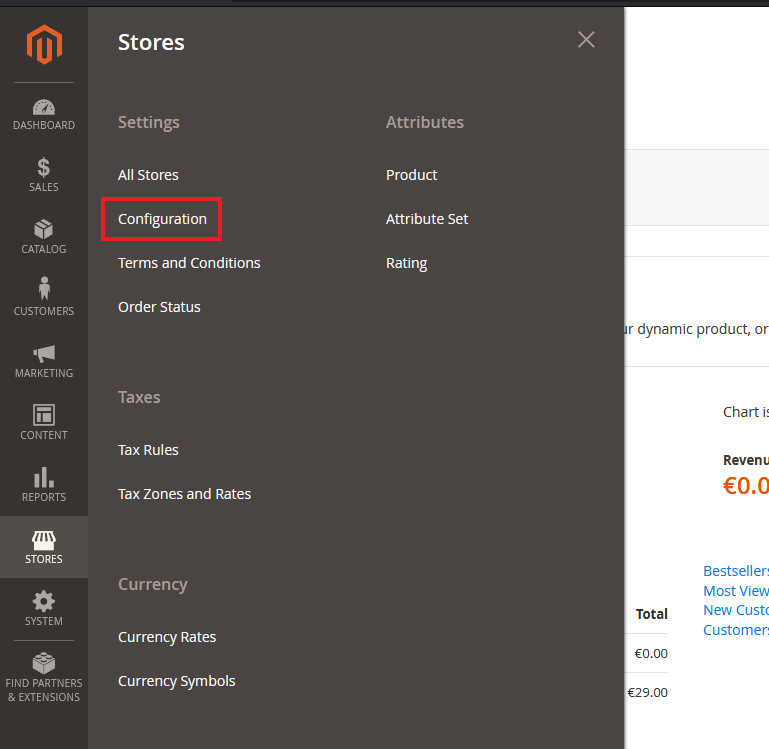
Step 2 – Access plugin settings
Navigate to:
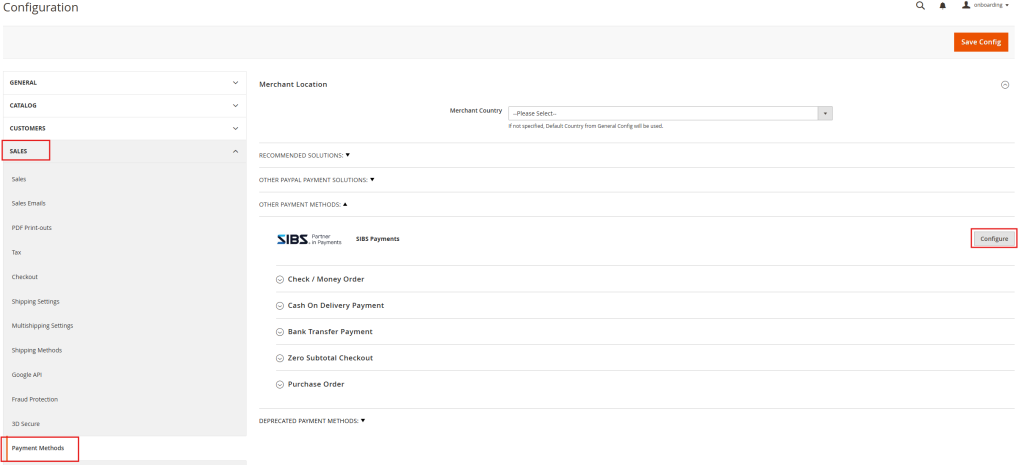
STEP 3 – OPEN SALES CONFIGURATION
Navigate to:
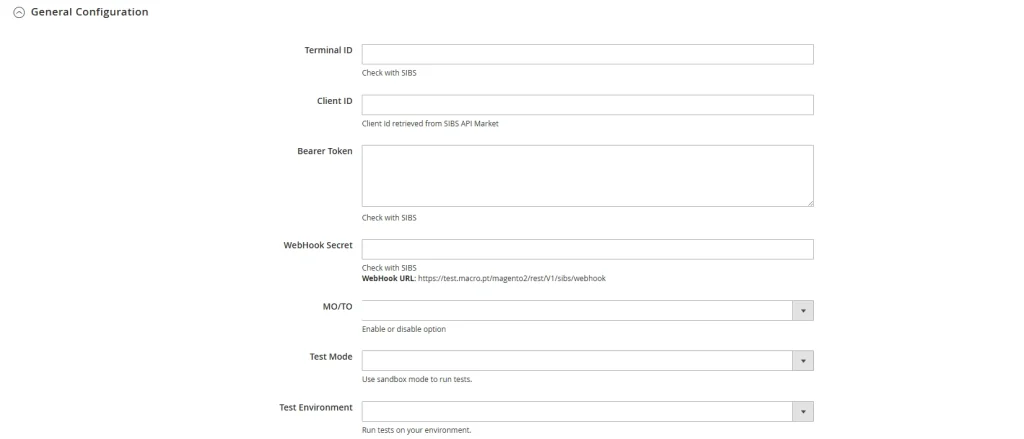
STEP 4 – ENTER SPG CREDENTIALS
All plugins require authentication parameters provided during onboarding.
Required fields:
- Terminal ID — Identifies the merchant terminal within SPG
- Client ID — Used for API authentication and validation
- Authentication Token — Bearer token used for secure communication with SPG services
STEP 5 – SELECT ENVIRONMENT
Plugins support two environments:
Sandbox
- Used for development and testing
- No real transactions
Production
- Used for live payments
- Requires onboarding approval
Always validate the integration in Sandbox before switching to Production.
STEP 6 – SAVE CHANGES
Apply configuration changes before enabling payment methods.
STEP 7 – CUSTOMIZE YOUR PAYMENT OPTIONS
The Magento plugin supports a range of SPG payment methods, including:
- MB WAY
- MULTIBANCO References
- Cards (Visa, Mastercard, etc.)
Notes:
- Payment method availability depends on your SPG contract and merchant setup
- Some screens and configuration labels may vary depending on WooCommerce version
- If you change credentials or environment, re-test a full payment flow before going live